Technical Specifications Item Number: AB7312-B Brand: Anybus (HMS Networks) Country of Origin: Sweden PROFIBUS Mode: DP Device (Slave) PROFIBUS Functionality: PROFIBUS-DP/DPV1 Slave per EN 50170 extensions; acyclic communication DP-V1 Class 1 and Class 2; acyclic user parameter data and diagnostics up to 237 bytes; Sync; Freeze; Watchdog PROFIBUS Baud Rate: 9600 bit/s to 12 Mbit/s (automatic detection) PROFIBUS Device Address: 0 to 125 PROFIBUS Input Data Size: 244 bytes PROFIBUS Output Data Size: 244 bytes (maximum 344 bytes total input plus output) PROFIBUS Configuration File: GSD file provided CAN Mode: Generic CAN CAN Baud Rate: 20 kbit/s to 1 Mbit/s CAN Functionality: CAN 2.0A and 2.0B (11-bit and 29-bit identifiers); 128 CAN transactions totaling 256 CAN frames; Produce, Consume, Query/Response modes; Cyclic, On Data Change, Single Shot, Trigger Byte update modes; Data Word Swap option Input Voltage: 24 V DC (-10% to +10%) Current Consumption: 100 mA nominal at 24 V DC; 250 mA maximum Power Connector: 2-pin 5.08 mm Phoenix plug connector Reverse Polarity Protection: yes Short Circuit Protection: yes Isolation: yes Operating Temperature: -25 to +55 °C Storage Temperature: -40 to +85 °C Protection Class: IP20 Mounting: DIN-rail (EN 50022) Net Dimensions: 27 mm width × 120 mm height × 75 mm depth Net Weight: 150 g Certifications: CE, UL, ATEX, WEEE UL File: E214107 (Ordinary Location UL 508, CSA C22.2 No. 142); E203225 (Hazardous Location Class I Division 2 Groups A,B,C,D T4) Warranty: 3 years
Functional Features Converts CANopen and any custom CAN 1.0, 2.0A, or 2.0B protocol to PROFIBUS DP-V1 without modifying the CAN device. Visual CAN frame builder in the Anybus Configuration Manager enables drag-and-drop transaction setup. Supports up to 128 CAN transactions and 256 CAN frames with flexible trigger modes. Automatic PROFIBUS baud rate detection from 9600 bit/s to 12 Mbit/s. Acyclic DP-V1 Class 1 and 2 communication supports parameter access and diagnostics. Sync and Freeze commands enable synchronized I/O updates across the PROFIBUS network. Save and Load function replicates configurations across multiple installations.
Application Scenarios Integration of CAN-enabled drives, sensors, HMIs, and embedded controllers into Siemens, Allen-Bradley, Schneider, and other PROFIBUS-based PLC systems. Used in factory automation, automotive production lines, material handling systems, packaging machinery, and process plants where CAN devices must communicate with a PROFIBUS DP master.
Performance Parameters PROFIBUS cyclic data: up to 244 bytes input and 244 bytes output PROFIBUS total I/O: 344 bytes maximum combined CAN frame capacity: 256 frames across 128 transactions Configuration: via Anybus Configuration Manager (Windows) PROFIBUS connector: 1× D-sub 9-pin female CAN connector: 1× D-sub 9-pin male Address setting: 2× rotary address switches Humidity: 5 to 95% RH non-condensing EMC: EN 61000-6-2, EN 61000-6-4, EN 55022 Class A
Material Composition Blue flame-retardant plastic housing (ABS/PC blend). Gold-plated D-sub connectors. Steel DIN-rail mounting clip. PCB with conformal coating. Internal galvanic isolation components between CAN, PROFIBUS, and power circuits.
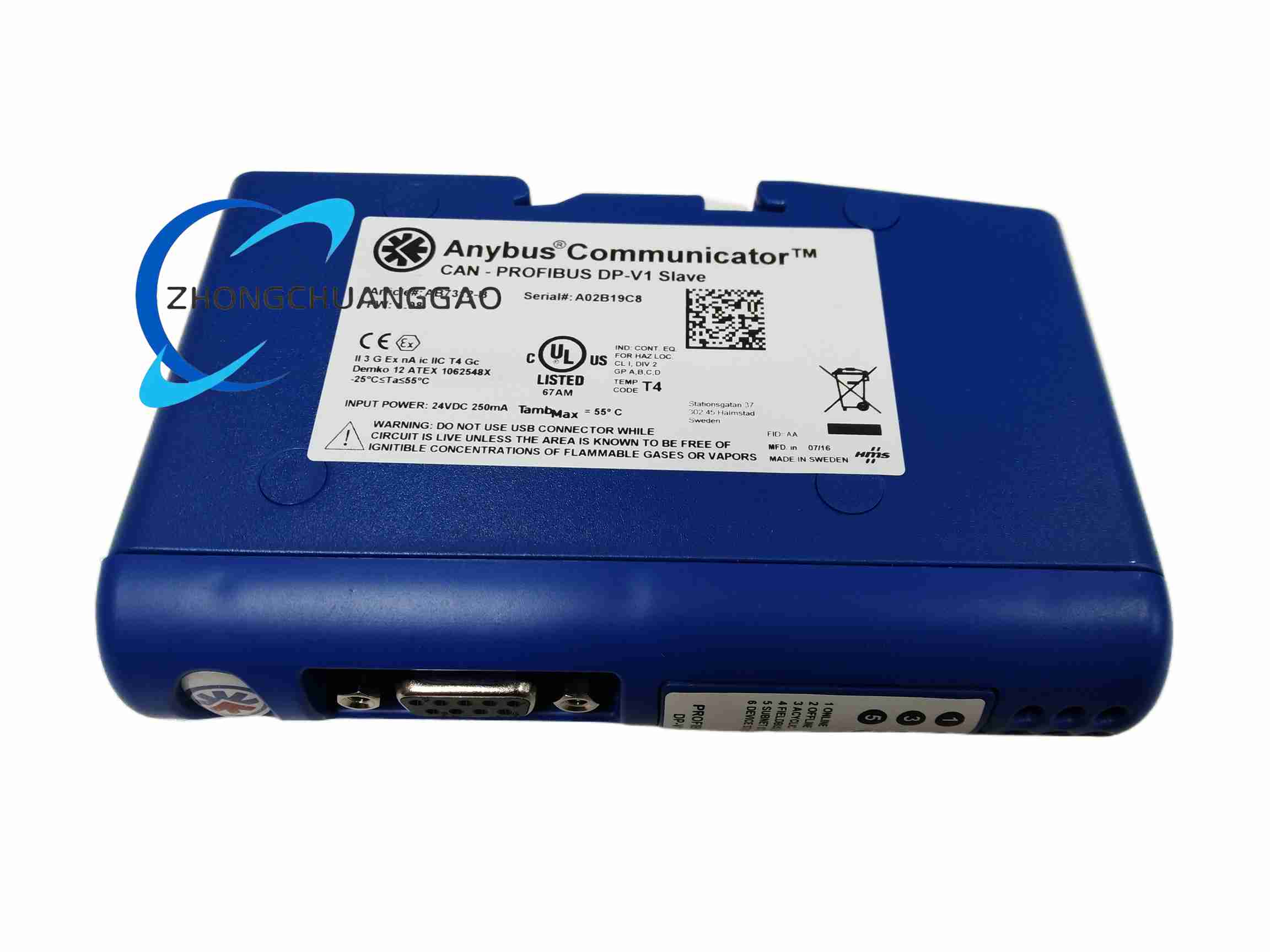
Structural Features Slim 27 mm wide DIN-rail mount housing. Front panel features two rotary address switches, a D-sub 9-pin male CAN connector, status LEDs (power, CAN activity, PROFIBUS activity, fault), and a 2-pin Phoenix power connector. Side panel provides a D-sub 9-pin female PROFIBUS connector. Internal dual-processor architecture handles CAN protocol parsing and PROFIBUS stack independently.
Working Principle The gateway operates as a CAN master/monitor on one side and a PROFIBUS DP-V1 slave on the other. The CAN interface transmits and receives CAN frames according to the configured transaction table. Received CAN data is stored in an internal dual-port memory buffer. The PROFIBUS interface maps this buffer to PROFIBUS input data, making it visible to the PLC master. Output data from the PROFIBUS master is written into the buffer and subsequently transmitted as CAN frames. The protocol conversion is fully transparent and requires no programming.
Installation Requirements Mount the gateway on a standard EN 50022 DIN rail inside an IP20 or higher enclosure. Connect 24 V DC power to the 2-pin Phoenix connector, observing polarity. Connect the PROFIBUS DP cable to the D-sub 9-pin female connector with proper termination at the network endpoints. Connect the CAN bus cable to the D-sub 9-pin male connector with 120 Ω termination at both ends. Set the PROFIBUS node address using the two rotary switches. Import the GSD file into the PLC engineering tool and configure the I/O data mapping.
Usage Precautions Do not install the device in environments exceeding IP20 protection without an appropriate enclosure. Ensure 24 V DC supply stays within -10% to +10% tolerance. Terminate both ends of the CAN bus and PROFIBUS bus with the correct resistance. Do not exceed 1200 m for PROFIBUS at low baud rates or the corresponding distance for the selected rate. Use the Anybus Configuration Manager to save configuration before power cycling. Verify CAN baud rate matches the connected device exactly. Ground the gateway through the DIN rail for EMC performance.





Reviews
There are no reviews yet.